
Locating your favorite television content often feels like navigating a maze. Full episodes sit behind paywalls, viral clips circulate on TikTok, and deleted scenes remain locked inside physical Blu-ray box sets or exclusive streaming vaults. This fragmentation is not accidental it is driven by complex content windowing strategies and licensing agreements.
Understanding how network distributors allocate full episodes, short highlights, and unreleased footage allows you to find exactly what you want without paying for unnecessary subscriptions.
The TV Distribution Ecosystem: Core Business Models
The distribution of television content rests on three distinct monetization frameworks. Each model dictates what type of content appears on a platform and how long it stays there:
- SVOD (Subscription Video on Demand): Monthly subscription services such as Netflix, Max, and Disney+. These platforms prioritize complete past seasons, high-value back catalogs, or platform-exclusive originals to retain subscribers.
- AVOD / FAST (Ad-Supported Video on Demand / Free Ad-Supported Streaming TV): Ad-supported platforms like YouTube, Pluto TV, Tubi, or free broadcast network apps. These channels focus on short catch-up windows for recent broadcasts or ad-monetized short clips.
- TVOD (Transactional Video on Demand): Pay-per-view or digital purchase storefronts such as Apple TV and Amazon Prime Video Store. This model caters to viewers who want to own specific episodes or full seasons outright without maintaining an ongoing subscription.
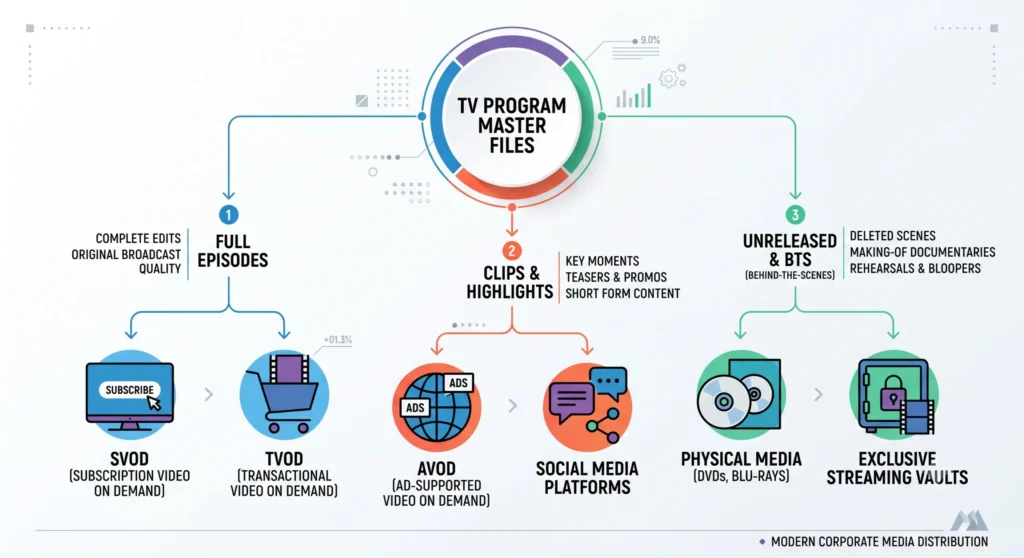
Full Episode Distribution: From First-Run Broadcast to Long-Term Archival
Full episodes represent a television franchise’s core commercial value. Availability depends primarily on whether a show is currently airing or has concluded its broadcast lifecycle.
Broadcaster Catch-Up Platforms (Short-Term Availability)
For active TV shows, major television networks (such as NBC, CBS, or ABC) retain first-run rights.
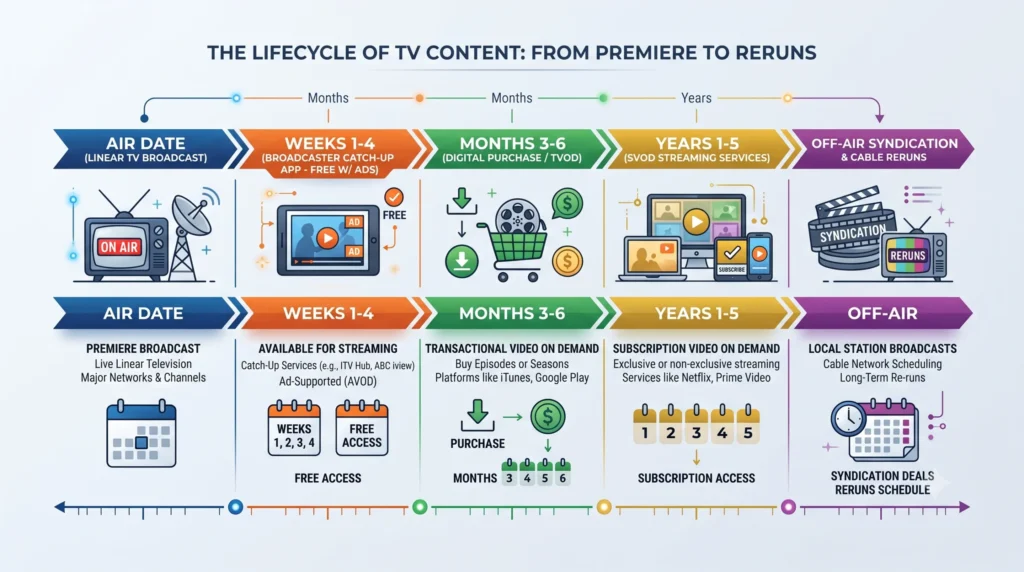
Networks typically upload newly aired episodes to their proprietary apps or websites within hours of the linear broadcast. However, these episodes remain available for free on a short “catch-up window” usually lasting between two to four weeks. Once this window closes, the episodes are removed to prepare for downstream licensing deals.
Off-Network Syndication and SVOD Rotation
When a season ends or a series finishes its run, distribution rights shift to off-network syndication.
Production studios auction off streaming rights to the highest SVOD bidder. Because these commercial contracts are time-bound (often spanning 1 to 5 years), a popular series may stream on Netflix today, only to migrate to Peacock or Paramount+ next year once the contract expires.
Digital Storefronts (TVOD)
When SVOD licensing deals expire or become geographically restricted, TVOD platforms offer the most consistent access. Viewers can purchase digital rights to individual episodes or full seasons on Apple TV, Google TV, or Amazon Prime Video. Unlike SVOD libraries, digital purchases are rarely subject to content rotation.
Clips and Short-Form Content: A Multi-Platform Marketing Funnel
Unlike full episodes which are strictly protected behind windowing strategies clips, highlight reels, and memorable scene excerpts are distributed widely across open platforms with no expiration date.
- Official YouTube Channels: YouTube serves as the primary archival hub for short-form television content. Network marketing teams publish key scene highlights (typically 2 to 5 minutes long) shortly after an episode airs to drive viewer conversion toward paid full-episode services.
- Vertical Short-Form Platforms (TikTok, Instagram Reels, YouTube Shorts): Social media teams reframe dramatic or funny moments into 9:16 vertical formats with dynamic captions to engage mobile-first audiences.
The Shortcut Trap: Clips vs. Full Availability
A recurring source of viewer frustration is assuming that a platform hosting official clips also hosts the complete episode. Networks deliberately distribute clips as promotional bait on free social media apps, while keeping the full narrative behind a paid SVOD or TVOD barrier. Attempting to piece together full episodes via fan clips usually leads to low-quality pirated uploads or broken links.
Unreleased Footage and Behind-the-Scenes Material
Unreleased content including deleted scenes, extended director’s cuts, behind-the-scenes (BTS) featurettes, blooper reels, and unaired pilots follows a completely different distribution logic than main broadcast episodes.
Physical Media Releases (Blu-ray / DVD Box Sets)
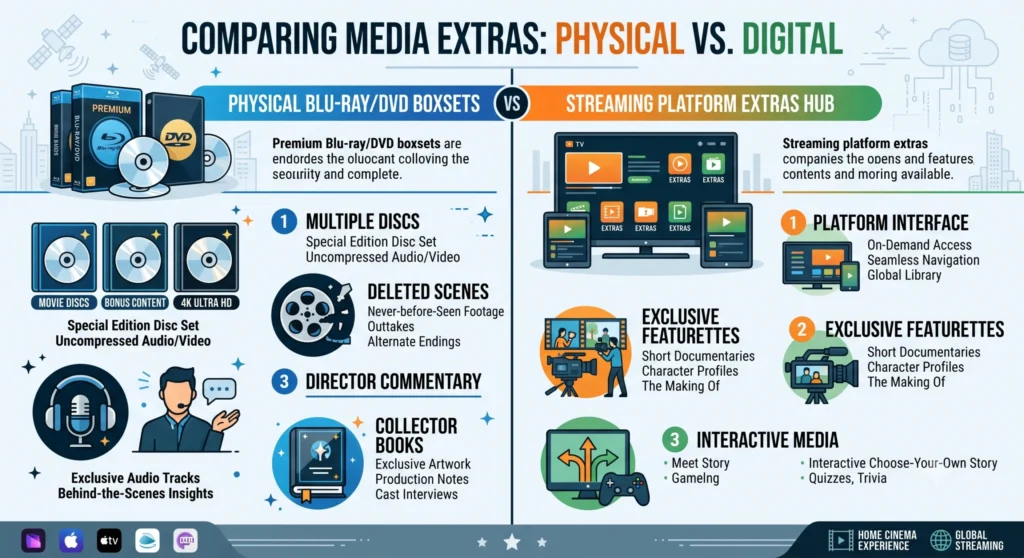
Historically and currently, physical disc releases remain the definitive home for unreleased footage. Studios bundle exclusive deleted scenes and audio commentaries into special physical editions to incentivize collector purchases.
Platform-Exclusive Retention Drivers
In the streaming era, studios use unreleased material to reduce subscriber churn. Services like Disney+ and Max incorporate dedicated “Extras” hubs directly within a show’s landing page, offering BTS mini-documentaries that cannot be legally streamed anywhere else.
Why Certain Unreleased Videos Disappear
Significant portions of filmed material never reach digital platforms due to unresolved music licensing issues, union talent residual contracts, or creative editing decisions. If an unreleased segment is not featured in an official physical box set or a platform’s bonus section, it remains locked in the studio vaults.
Master Content Matrix: Content Types vs. Channels
| Content Type | Primary Distribution Platform | Monetization Model | Primary Commercial Objective |
|---|---|---|---|
| Current Season Episodes | Network Broadcaster Apps (ABC, NBC, CBS) | Free Ad-Supported (AVOD) | Capture immediate broadcast viewership; maximize ad revenue |
| Past Season Library | SVOD Platforms (Netflix, Max, Peacock) | Monthly Subscription (SVOD) | Drive recurring subscriber retention and platform growth |
| Complete Archived Series | Digital Stores (Apple TV, Amazon, Google) | Transactional / Per Episode (TVOD) | Maximize long-term long-tail sales after SVOD expiry |
| Clips & Scene Highlights | YouTube, TikTok, Facebook, Instagram | Free Access | Social media engagement; promotional funnel for full episodes |
| Deleted Scenes & BTS | Blu-ray Box Sets / SVOD “Extras” Sections | Physical Purchase or Premium Tier | Upsell super-fans; enhance collector and premium value |
A 4-Step Method to Locate Any TV Video Efficiently
To avoid dead-end searches and unnecessary subscription purchases, follow this structured lookup protocol:
Target Official YouTube Channels for Specific Clips: If you only need to verify a specific line or scene, query [Show Title] + [Scene Keyword] directly on the network’s official YouTube channel instead of subscribing to a full streaming package.
Identify the Broadcast Status: Determine whether the show is currently airing a new season or has ended. If it is currently airing, check the network’s official broadcaster app first for free catch-up episodes.
Check the Official Network Episode Guide: Visit the broadcaster’s official landing page or show portal. Official guides explicitly state which streaming platform currently holds active license rights for each season.
Use Content Aggregator Engines: Utilize database aggregators like JustWatch or IMDb. These platforms scan region-specific streaming rights in real time, showing exactly where a series is streaming (SVOD) or available for digital buy/rent (TVOD).
Understanding distribution helps you save time and money when searching for your favorite shows. Identify your specific need whether full episodes, short clips, or behind-the-scenes to choose the most suitable platform. Searching through official tools ensures you enjoy the entire show effortlessly.